Whole playlists · every track saved on its own as it finishes
Spotify Playlist Downloader
Download a whole Spotify playlist as MP3
Free, or pay once and be done
Thank you
Free
$0no card, no account
- One track per press — pick a row and go
- 300 tracks a day
- 320 kbps MP3, ID3 tags, cover art, .lrc lyrics
- Every link type, and the cover art tool
- One file per track, saved as each lands
Supporter One-time
$4.90+once — yours for good
- A whole playlist in one press, any size
- The finished batch as one ZIP, in one press
- No daily limit — nothing counting down
- Same 320 kbps MP3 — no quality tier
- Pay once — yours for good, not a subscription
The whole list is unlocked on this browser — tick as many rows as you like, send them in one pass, take the lot as one ZIP when it lands, and nothing counts down. If it keeps being useful, sharing it does more than paying twice would.
Step by step
How to download a Spotify playlist online — 3 steps
Copy the link, tick the rows, let the files land.
01
Copy the playlist link
In Spotify, right-click the playlist in the sidebar → Share → Copy link to playlist. The URL must contain /playlist/ — a /search/ URL is the page you were browsing, not the playlist.
open.spotify.com/playlist/…
02
Tick the rows you want
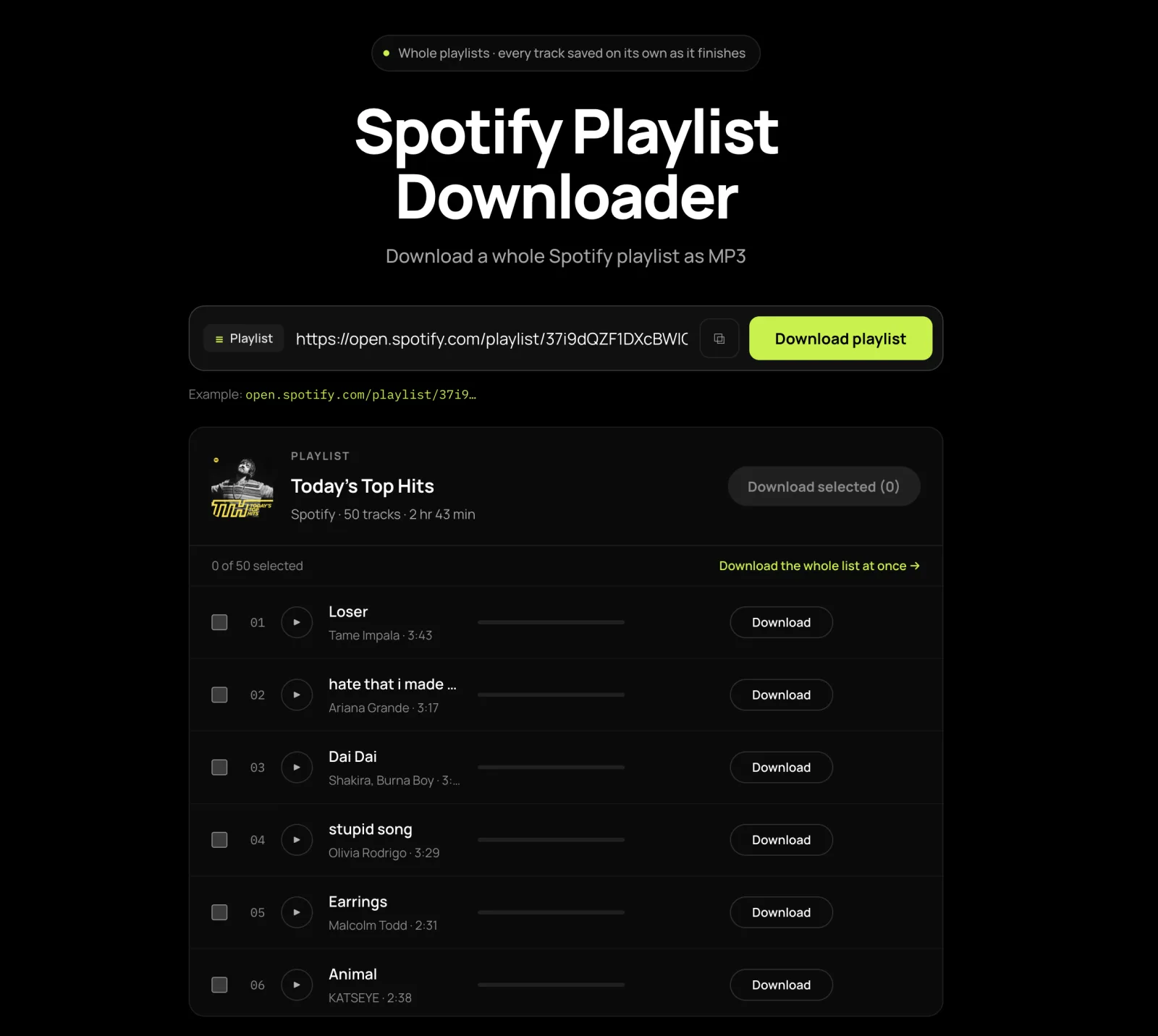
The whole track list appears with a checkbox on every row and nothing queued yet. A free press takes one track, so press Download on a row — or, as a supporter, tick as many as you want and the count on the button follows.
03
Let the files land
Each track saves itself the moment it is ready, tags and cover art already inside. Allow your browser to save several files, or only the first one arrives.
Coral Field - Midnight Transit.mp3
Where the link is. Desktop app — right-click the playlist in the left sidebar → Share → Copy link to playlist, which is quicker than opening it. Phone — three dots under the title → Share → Copy link. Web player — the address bar with the playlist open. The usual way it goes wrong is copying from a search screen: if the URL contains /search/ you copied the page you were browsing. A ?si= suffix, an /intl-de/ segment and an old /user/…/playlist/… link are all fine as they are.
Before you paste
Which Spotify playlists can be downloaded
One kind cannot be read at all, and two have no shareable link. All three have a workaround that takes under a minute.
| Playlist type | Works? | What to do |
|---|---|---|
| Public | Yes | Copy the link and go |
| Editorial and algorithmic | Yes | As long as the link still opens for someone not signed in |
| Collaborative | Yes, if public | Behaves exactly like a normal playlist |
| Private | No | Three dots → Make public, load it here, then set it back |
| Liked Songs | No link exists | Copy into a new playlist first — four steps below |
| Discover Weekly, Release Radar | Personal to your account | Same four steps as Liked Songs |
| Local files you added yourself | No | Not in Spotify’s catalogue, so they cannot be found |
How to download your Spotify Liked Songs
- In Spotify, create a new empty playlist — call it anything.
- Open Liked Songs, click into the list and select all (Ctrl+A on Windows, Cmd+A on Mac).
- Drag the selection onto the new playlist in the sidebar.
- Make it public, paste its link here, download, then set it private again.
Worth doing even if you never download a file: Liked Songs has no export of any kind, so one lost login takes years of collecting with it. The same four steps are what Discover Weekly and Release Radar need.
Selective downloads
Download only the songs you want from a playlist
A 60-track playlist where you want four of them is the normal case, not the exception.
- Paste the playlist link. Every track arrives as a row with a checkbox and nothing is queued yet.
- Clear the selection, then tick the rows you actually want. The count on the button follows, so it always shows what you are about to take.
- Unsure which version a row is? Press play and listen to it first — the player bar plays the real file at full length, and nothing is written to your disk until you press “Save this track”.
Four tracks out of sixty costs four slots, not sixty: the free figures are one a press and 300 a day, and only the rows you tick are ever fetched. Playing an unfetched row does fetch it, so a listen counts the same as a download — listening is free of files, not free of the quota.
Six things it does
Why this Spotify playlist downloader
The two that matter on a long list are the first two, and no competitor states either.
No ceiling on the playlist
A 400-track list is as welcome as a 12-track one, today and again tomorrow. Length changes how you submit it, not whether you may.
Past Spotify’s own listing limit
Spotify’s own listing stops at 100 items; this pages on past it, so track 137 does not quietly cease to exist.
Read it before you press
Pasting gives you every track as a checkbox with nothing queued. The count on the button follows what is ticked, so you know what you are getting.
The boundary, stated here
Hand-picking works within the first 100 rows shown and a selection past that is refused — take later rows as part of a whole-list run.
No ZIP to wait for
Each track lands on its own, so a miss costs you that track — and a job you stop keeps everything already saved. Supporters can bundle the batch afterwards.
How a long list actually goes
Free: press a row, save the file, press the next — a 200-track playlist is 200 presses. One payment submits the whole list at once, as one ZIP.
What lands on disk
Spotify playlist downloader: ZIP, file names and track order
What people expect, what actually arrives, and the thirty seconds that fixes the one real difference.
| What you might expect | What actually arrives |
|---|---|
| One ZIP at the end | One file per track, saved as each finishes — an archive can only be built after the slowest row, so it is offered afterwards (supporters get a button that packs the batch) rather than waited for |
| A folder named after the playlist | Loose files in your downloads folder, named Artists - Title.mp3 |
| Files numbered 01, 02, 03… | No position prefix — anything sorting by filename will alphabetise the list. Fix below |
| Playlist order lost everywhere | Library managers are fine: the ID3 track number is the song’s place on its own album, which is what they read |
| One prompt per file | One prompt for the job — allow “download multiple files”, or you get the first and nothing after it |
| Playlist cover art in the download | Not included; the cover art tool pulls it at full resolution |
Thirty seconds: numbering the files for a car or an MP3 player
Select the files in playlist order and batch-rename them with a number prefix — F2 in Windows Explorer, or Finder’s Rename → Format → Name and Index on macOS. Both add 01, 02 and so on in the order you selected. Worth doing before a drive, not at a junction — and the same applies to games that read a folder of MP3s for their in-game radio.
Each file is MP3 at 320 kbps, roughly 9 MB for four minutes, so a 24-track playlist lands near 215 MB. What is inside one is set out under bitrate, tags and file size.
This site publishes no music library. A personal copy of music you already have access to is accepted in many jurisdictions; redistributing it, re-uploading it or using it commercially is accepted in none. If you hold rights in something reachable here, the copyright page says how to have it removed.
FAQ
Spotify playlist downloader FAQ
Twelve, each answered in its first sentence. Copyright, privacy and takedowns are on the legal pages in the footer.
Do I get one ZIP, or one file per track?
One file per track, and nothing waits for a ZIP: each MP3 lands the moment it finishes, so a track that misses costs you that track and nothing else, and a job you stop keeps everything already saved. An archive can only be built after the slowest row, which is the failure this avoids. If you have supported the site, a button appears once the batch has landed that saves the whole of it as one ZIP — built after the files are already safe on your disk, rather than instead of them.
Can I download only some songs from a playlist?
Yes — that is the default. Pasting gives you a list with a checkbox on every row and nothing queued; clear it and tick only what you want. Four tracks out of sixty costs four slots against the free one-a-press and 300-a-day figures, because only ticked rows are ever fetched.
Can I play a track before adding it to the download?
Yes. Press play on any row and the player bar plays the real file at full length — useful when a playlist holds two versions of the same song. Nothing is written to your disk until you press “Save this track”, though playing an unfetched row fetches it, so it counts against the daily figure like a download.
What is the maximum playlist size?
There is no maximum on the playlist itself. What differs is how the tracks are submitted: on the free path one per press — two downloads running at once — and 300 a day, and for supporters the whole list in a single pass, handed back as one ZIP, with no daily figure. A 400-track list is as welcome as a 12-track one.
Can I download a private Spotify playlist?
Not directly — there is no login step anywhere on this page, so a private playlist is as invisible here as in a logged-out browser. Set it public in Spotify, paste the link, and switch it back as soon as the track list has loaded. That window is a few seconds long.
Why did my playlist arrive in alphabetical order?
Because files are named “Artists - Title.mp3” with no position prefix, and players that sort by filename therefore alphabetise them. Select the files in playlist order and batch-rename them with a number prefix — F2 in Windows Explorer, or Finder’s Rename → Format → Name and Index on macOS. It takes about thirty seconds.
How do I download my Liked Songs?
Liked Songs has no shareable link, which is why pasting anything from that screen fails. In Spotify, create a new playlist, open Liked Songs, select all with Ctrl+A or Cmd+A, and drag them across. Make the new playlist public, paste its link here, then set it private again.
Do editorial playlists like Discover Weekly work?
Yes, as long as the link still opens for somebody who is not signed in. Editorial and algorithmic playlists behave exactly like any public one. Discover Weekly and Release Radar are personal to your account, so copy them into a normal playlist first — the same step Liked Songs needs.
A few tracks failed. What do I do?
Open the failed row. Where a match was the problem it lists other recordings of the same song with how far each one’s length differs, and you pick one or search in your own words. Where the route was the problem it offers a retry, worth pressing a few minutes later. The rest of the playlist carries on either way.
Why can I not tick a row past number 100?
Hand-picking individual rows works within the first 100 the list shows; a selection reaching past that is refused. Take the later rows as part of a whole-list run instead.
Only the first file downloaded. What now?
Your browser blocked the rest. Press download again and allow “download multiple files” when it asks. On a phone the prompt comes early in the job, so answer it and leave the tab open — mobile Chrome and Safari both stop saving if you navigate away mid-run.
Can I download a Spotify playlist without Premium?
Yes. Nothing here reads your account — no login, no OAuth screen, no password field — so a free account, or no Spotify account at all, behaves exactly like a Premium one. If the link opens in a logged-out browser, this page can read it.
How long does a 100-track playlist take?
A 20-track playlist is usually a couple of minutes and a 100-track one roughly five times that, with popular tracks returning in seconds. Start it and leave the tab open.
Can I export the playlist as a track list or M3U?
No — what comes out of this page is audio, not a CSV, a spreadsheet or an M3U. If you want a text export as well, copy Liked Songs into a real playlist first, because every tool that produces one needs a shareable playlist to read.
Beyond playlists: albums, artists and single tracks
Three are this same downloader pointed at a different link — one for a single row, one for a whole artist. The rest: the file specification, an artwork tool and a podcast tool.