Show and episode links · the publisher’s original file
Spotify Podcast Downloader
Download Spotify podcast episodes, or a whole show, as MP3
Free, or pay once and be done
Thank you
Free
$0no card, no account
- One track per press — pick a row and go
- 300 tracks a day
- 320 kbps MP3, ID3 tags, cover art, .lrc lyrics
- Every link type, and the cover art tool
- One file per track, saved as each lands
Supporter One-time
$4.90+once — yours for good
- A whole playlist in one press, any size
- The finished batch as one ZIP, in one press
- No daily limit — nothing counting down
- Same 320 kbps MP3 — no quality tier
- Pay once — yours for good, not a subscription
The whole list is unlocked on this browser — tick as many rows as you like, send them in one pass, take the lot as one ZIP when it lands, and nothing counts down. If it keeps being useful, sharing it does more than paying twice would.
Step by step
How to download a Spotify podcast episode — 3 steps
Three steps, and the one place it can need a nudge from you.
01
Paste a show or episode link
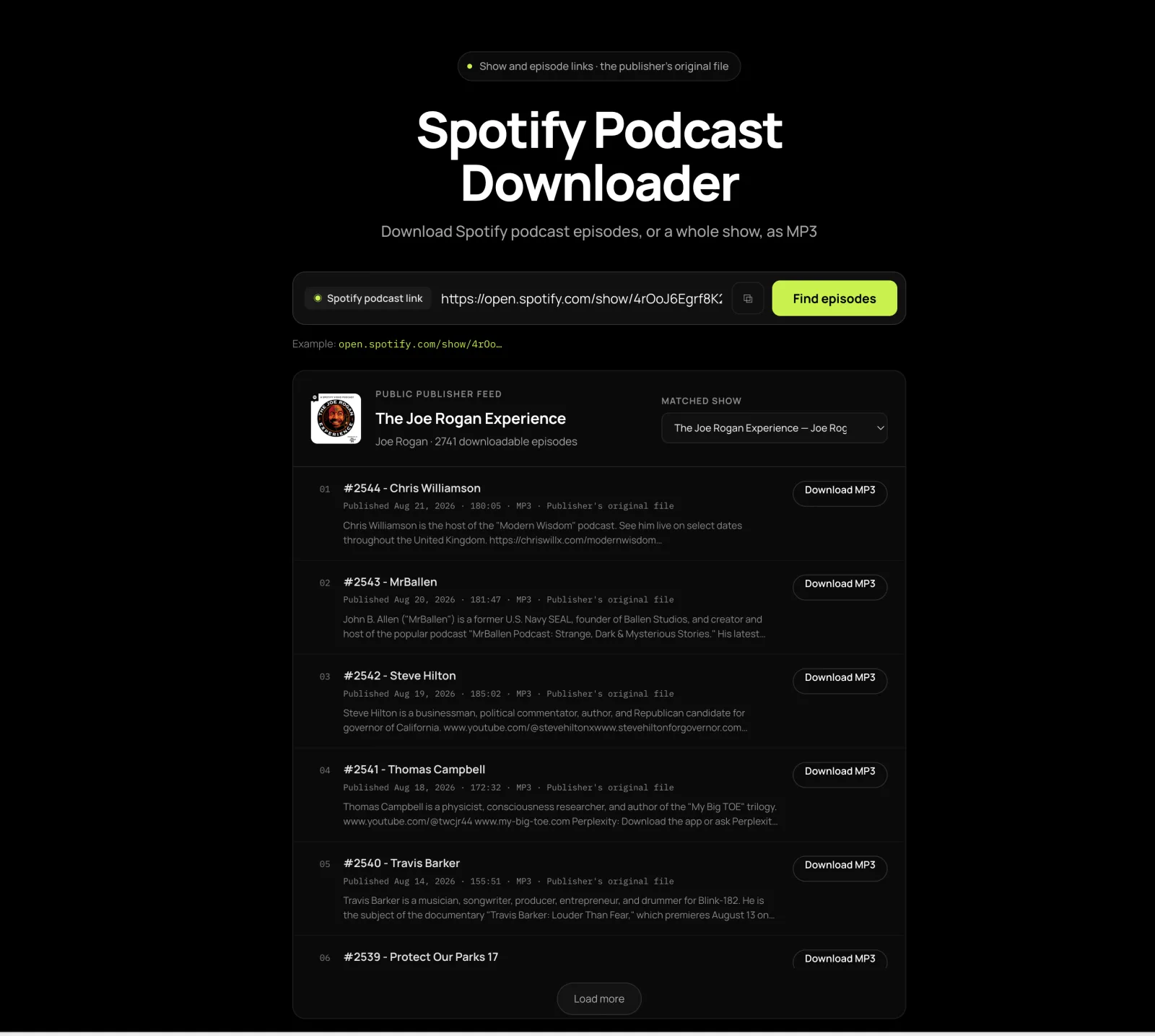
In Spotify: three dots → Share → Copy link. A /show/ link opens the latest episodes; an /episode/ link jumps to the one you pasted and marks it.
02
Check the show above the list
If the artwork or publisher is not the one you expected, switch it in the “Matched show” menu — shows share names more often than you would think.
03
Press Download on the episode
Format, duration and file size are on the row before you press. Older episodes load in pages — press Load more until yours appears.
What lands on disk
What you get: the publisher’s original file with episode tags
Nothing is re-encoded here, which is why every claim below is about their file rather than ours.
| Format | Whatever the publisher supplied — usually MP3, sometimes M4A, OGG or MP4 |
|---|---|
| Re-encoding | None. The file is passed through untouched |
| Tags and cover art | The publisher’s own — not added, rewritten or stripped here |
| File size | Shown on the row before you press; 100–200 MB for a two-hour show |
| Length cap | None, on the episode or the file |
| Bulk download | One button per episode; older ones load with Load more |
| Account | None, and no Premium |
Before you paste
Which Spotify podcasts can you download
Worth thirty seconds now rather than a blank list later.
Works
- Public Spotify /show/ and /episode/ links.
- Any show that is also listed in other podcast apps.
- Audio and video files the publisher chose to distribute.
- Old episode links, as long as the title has not changed beyond recognition.
Does not work
- Spotify exclusives that exist nowhere else.
- Private or account-only material, and audiobook chapters.
- Spotify-hosted video when the feed carries audio only.
- Shows whose publisher has broken or blocked their own feed.
Six things it does
Why this Spotify podcast downloader
The first one is the inverse of what the category advertises: nothing is added to your file.
The publisher’s original file
Nothing is re-encoded and no tag is rewritten. That avoids a second lossy conversion, and the badge on the row is the file you get.
An episode link lands on that episode
The one you pasted is moved to the top and marked. Where the match is not reliable it says so instead of guessing for you.
Name collisions are switchable
Shows share names and directory copies exist, so the closest alternatives stay visible for you to pick by publisher and artwork.
Three minutes or four hours
No time limit and no file size cap. A long-form interview goes through the same path as a three-minute briefing.
Size and format up front
Every row carries the format, the duration and the size the feed declares, so a 300 MB episode is never a surprise on mobile data.
No account, no Premium
No login field and no Spotify credentials asked for. Premium does not change which shows have a public feed.
FAQ
Spotify podcast downloader FAQ
Ten questions, each answered in its first sentence.
Can I download a Spotify podcast episode here?
Yes, when the publisher also distributes the show through a public feed — which most podcasts do. Paste a Spotify /show/ or /episode/ link and the episodes appear with a Download button each. Spotify-exclusive shows with no public feed cannot be downloaded here, and the tool says so rather than failing quietly.
The episode I pasted is not at the top. What now?
The pasted episode is normally moved to the top and marked “Your pasted episode”. If its title has changed since publication, the tool says the match was not reliable and lists the latest episodes instead of guessing — scroll or press Load more and find yours by date.
Can I download every episode of a show at once?
No — there is one Download button per episode and no download-all. Long archives load in pages: press Load more until the episode you want appears. For a whole back catalogue, a podcast app that supports bulk download is the better tool.
What format and file size do I get?
The publisher’s original file, unmodified. Most feeds publish MP3; some use M4A, OGG or MP4. Each row shows the format, the duration and the declared size before you press Download, so a 300 MB episode is never a surprise.
Are the episode tags and cover art included?
Whatever the publisher put in the file is what you get — this tool does not add, rewrite or strip tags, because it hands over their original rather than re-encoding it. Most podcast feeds carry the episode title, show name and date already, which is why the file drops straight into Apple Podcasts, Pocket Casts or AntennaPod.
The wrong show was matched. How do I switch?
Use the “Matched show” menu above the episode list. Shows share names and directory copies exist, so the closest alternatives stay visible — pick the one whose publisher and artwork you recognise.
Do Spotify-exclusive and video podcasts work?
An exclusive works only if its publisher also has a public feed; without one, Spotify’s own offline mode is the only route. Video works when the feed itself carries a video file. If Spotify hosts the video and the feed carries audio, you get the audio.
Where does the file land on a phone?
On Android, in Downloads — move it to Music or Podcasts if your player only indexes those. On iPhone it lands in the Files app; open it there, or use Share → Copy to VLC. On a desktop it is your usual downloads folder, and any player or car USB stick will take it from there.
Can I save an episode before it is taken down?
That is the one thing a download does that a subscription cannot — a saved file is unaffected when a show is delisted, goes exclusive or ends. It only works while the publisher’s public feed still carries the episode, so a show already pulled from the feed is out of reach here.
Do I need Spotify Premium or an account?
No. There is no login field on this page and Premium changes nothing — paste a public link and the episodes list. Nothing here asks for Spotify credentials.
More Spotify tools
For music rather than talk, use the Spotify downloader or open the focused tools below.