One album link · every track, tagged, cover inside
Spotify Album Downloader
Download a Spotify album as MP3 — online, free, with the cover in every file
Free, or pay once and be done
Thank you
Free
$0no card, no account
- One track per press — pick a row and go
- 300 tracks a day
- 320 kbps MP3, ID3 tags, cover art, .lrc lyrics
- Every link type, and the cover art tool
- One file per track, saved as each lands
Supporter One-time
$4.90+once — yours for good
- A whole playlist in one press, any size
- The finished batch as one ZIP, in one press
- No daily limit — nothing counting down
- Same 320 kbps MP3 — no quality tier
- Pay once — yours for good, not a subscription
The whole list is unlocked on this browser — tick as many rows as you like, send them in one pass, take the lot as one ZIP when it lands, and nothing counts down. If it keeps being useful, sharing it does more than paying twice would.
Step by step
How to download a Spotify album online — 3 steps
One link, and this Spotify album downloader puts the whole record on screen as rows you can hear before you keep them.
01
Copy the album link
In Spotify: three dots on the album → Share → Copy link. No link handy? Type the album and the artist into the same box and pick it from the results.
open.spotify.com/album/…
02
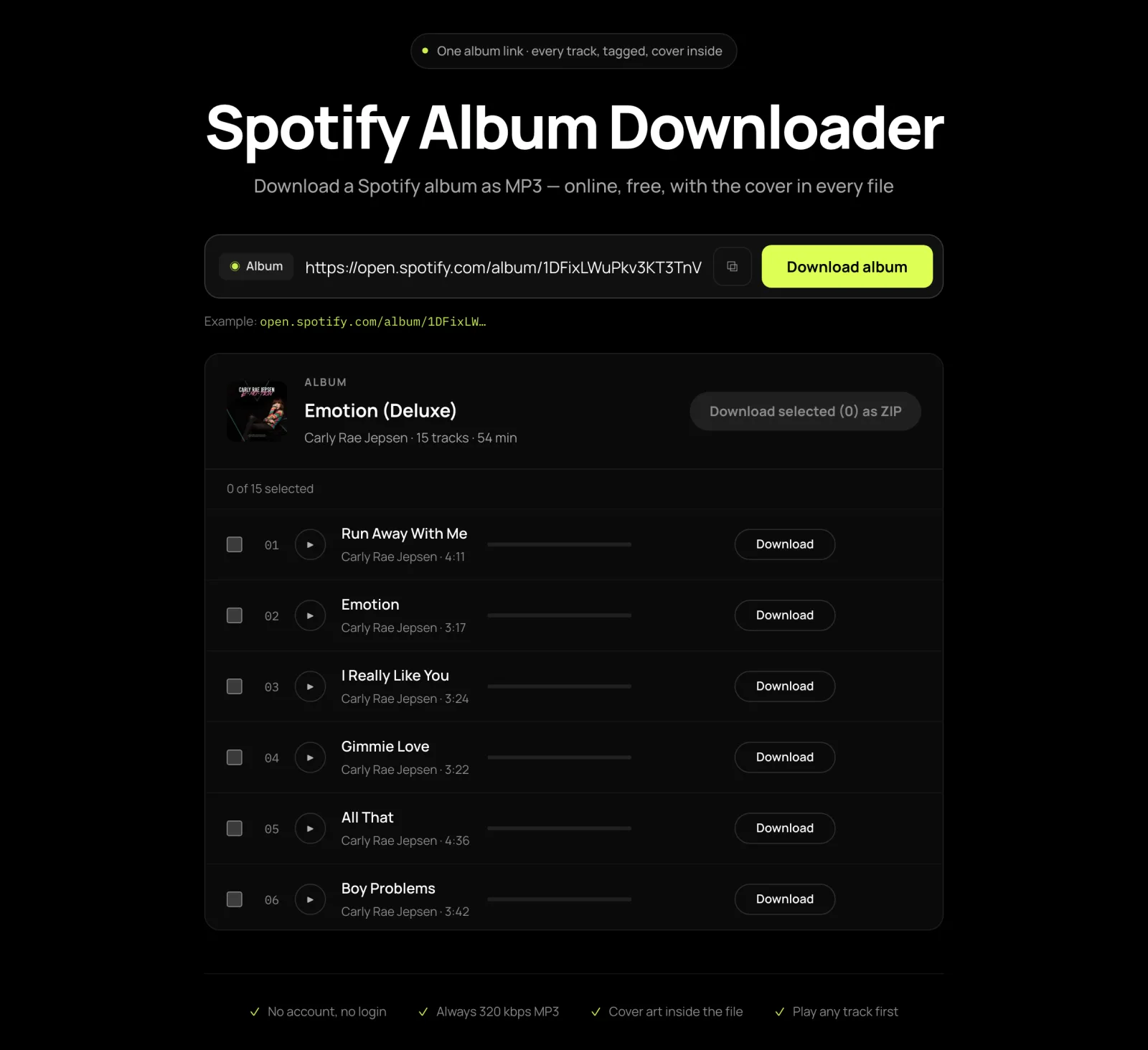
The record opens as a track list
Every track, in the album’s own order, with its length. Play any row in full before you decide — this is the file you would be saving, not a preview.
03
Download the tracks you want
Each one arrives as a 320 kbps MP3 with the album’s tags and its cover already inside. Rows that finish are saved as they finish.
04 Coral Field - Midnight Transit.mp3
If it is only the picture you want
Just the album artwork, without the songs
A different job from a Spotify album downloader, and a shorter route to it.
Everything above puts the cover inside the audio. If what you actually want is the image on its own — for a print, a phone wallpaper, a video thumbnail — downloading twelve MP3s to extract one JPEG is the long way round. The album art tool takes the same link and returns the cover at full size: 640×640 from Spotify, or 1000×1000 when iTunes has the same release. No audio, no waiting.
Formats people ask for
FLAC, WAV and “high quality”: what is honestly available
Short answer: 320 kbps MP3, and here is why that is the ceiling rather than a setting we left off.
The audio is matched from a public source and re-encoded once, to 320 kbps — the top of what MP3 does. There is no FLAC option and no WAV option, and adding them would be dishonest rather than generous: the source is already lossy, so a lossless container around it produces a file three or four times the size carrying exactly the same sound. You would pay for the bytes and hear nothing new.
This is worth knowing before you shop around, because the labels vary while the source behind them does not — HQ, hi-res, lossless, all pointing at the same public stream. What those tools sell is that same conversion with the first half of the story left out. Anything genuinely lossless has to come from a source that was lossless to begin with, and a public stream is not one.
The whole record at once
A full album in one press, and what that costs
What a full album costs this Spotify album downloader to produce, arithmetic first — because a limit with no reason behind it reads as a toll.
Every track this Spotify album downloader hands you is really searched for, downloaded and re-encoded on one small server we pay for. That is why the free path is metered by presses rather than by quality: it takes 1 track per press and 300 tracks a day. A twelve-track album is twelve presses — all twelve free, all twelve files landing, the complete album at the same 320 kbps with the same tags and the same cover.
A $4.90+ grant changes one thing about that: the twelve presses become one, the daily count stops applying, and the tracks come back as a single ZIP instead of twelve saves. It buys the handling, not the audio — the MP3s are byte-for-byte what the free path produces, because they come from the same place by the same route.
Six things it does
Why this Spotify album downloader
Each one is a mechanism you can check on the first album, not a claim.
The cover is in the MP3
The album’s 640×640 artwork is embedded in every file, not left beside it as a loose image. That is why a car stereo and an iPod both show it.
The bitrate is a number
Every file is 320 kbps, whichever track it is and whether or not you have paid anything. Written as a figure, so you can check it yourself.
No app, extension or program
It runs in the tab you already have open. No installer, no extension, no APK, and nothing left on the machine afterwards.
Any row plays in full
The whole track, not a thirty-second preview. What you hear is the file that would be saved, so a bad match shows up before the download.
Lyrics come along where they exist
A track with published synced lyrics gets an .lrc beside its MP3, so a player can scroll the words in time. One without simply has none.
A failed track speaks up
When a song cannot be matched, its row says why and offers recordings to pick from instead of quietly disappearing out of the list.
FAQ
Spotify album downloader FAQ
Twelve questions about downloading a Spotify album, each answered in its first sentence.
Is there a free Spotify album downloader?
This one. Every track is free at 320 kbps with tags and cover art, up to 300 tracks a day. The free path takes 1 track per press, so a twelve-track album is twelve presses — all of them free, and all twelve files land. A $4.90+ grant is what turns those presses into one, not what turns the audio on.
Can I download a whole Spotify album as MP3?
Yes, and MP3 is the only format here — always 320 kbps, never a lower one silently. Paste the album link, tick the rows you want, and each track saves with the album’s ID3 tags and its 640×640 cover written into the file.
Does the MP3 come with the album cover in it?
Yes, embedded in the file rather than dropped beside it as a loose image. That is what makes the album show its artwork in a car stereo, on an iPod or in any player that reads ID3 — no folder.jpg to manage and nothing to attach by hand afterwards.
Do I need an app, a program or a Chrome extension?
None of the three. This Spotify album downloader runs in the browser tab you already have open — there is no installer, no extension to add and no APK. That also means nothing to update and nothing left behind on the machine when you are done.
Is there an open-source album downloader on GitHub?
Yes — spotdl is the best known, and it is what this site runs on the server side. Doing it yourself means installing Python and ffmpeg and working from a command line, which is worth it if you want to script a library. This Spotify album downloader is the same engine with the setup already done.
Can I get FLAC or WAV instead of MP3?
No, and the reason matters more than the answer: the audio is matched from a public source that is already lossy, so wrapping it in FLAC or WAV would produce a much larger file with no more sound in it than the MP3. Any tool offering lossless from a Spotify link is doing that conversion and not telling you.
Are lyrics included with the album?
Where synced lyrics exist for a track, a matching .lrc file is saved next to the MP3, so a player that reads them scrolls the words in time. Tracks without published synced lyrics simply arrive without one — nothing fails and nothing is invented.
Can I download an album with more than 100 tracks?
Yes. Spotify’s own listing stops at 100 items, and long compilations and box sets are paged past it here so the rows past 100 are real, selectable rows rather than a truncated list.
How do I get the whole album as one ZIP file?
Tick the rows and press the download button above the list — that is the bulk path: they submit as one job and come back as a single archive. It is one of the three things a $4.90+ grant unlocks. The MP3s themselves are identical either way — the ZIP is how the same files arrive, not a better version of them.
What should I look for in an album downloader?
Three things that are checkable rather than claimed: whether the bitrate is stated as a number, whether the cover art ends up inside the file or beside it, and whether a track that cannot be found tells you why. A tool calling itself the best is telling you nothing — every one of them does.
Do I need Spotify Premium or an account?
Neither. This Spotify album downloader has no login field and asks for no Spotify credentials. A public album link is all it reads, and Premium changes nothing about what it can reach.
I only want the album cover image, not the songs.
Then the artwork tool is the shorter route — it pulls the cover at full size, 640×640 from Spotify or 1000×1000 from iTunes, with no audio involved. Its link is in the section above and in the menu.
More Spotify tools
For a single song or a whole playlist instead, the Spotify downloader and the focused tools below take the same kind of link.