Spotify at 640 px · iTunes at 1000 px · no watermark
Spotify Album Art Downloader
Download album art from Spotify and iTunes
Become a supporter$9.90+ one-time
We pay for spotmp3’s servers and bandwidth ourselves. A one-time contribution covers those bills and keeps the site free and running.
- Whole playlist as one ZIP
- Unlimited downloads
- Download many songs at once
- Fast download lane
Thank you
The whole list is unlocked on this browser — tick as many rows as you like, send them in one pass, take the lot as one ZIP when it lands, and nothing counts down. If it keeps being useful, sharing it does more than paying twice would.
The short version
What Is SpotMP3 Spotify Album Art Downloader?
spotmp3 is a free online tool that helps you save the cover art of any album, single or playlist at full size. Paste a Spotify link into this album art downloader, or just type an artist and album name, and it finds the cover on Spotify and iTunes at the same time. It works in the browser on Android, iPhone, Windows and Mac, with nothing to install.
It is easy to use and free, with no sign-up and no watermark. Spotify covers come at 640 × 640, and iTunes covers at 1000 × 1000 when you need a bigger image. Every image is the original file, never upscaled, and it is named Artist - Album so your folders stay tidy. People use it to fix missing artwork in a music library, make a phone wallpaper or print a small CD insert.
Step by step
How to Use Spotify Album Art Downloader?
01
Copy a link or think of the name
First, copy an album, song or playlist link from Spotify, or just have the artist and album name ready. Both work, and a name searches Spotify and iTunes together.
02
Paste it into the box
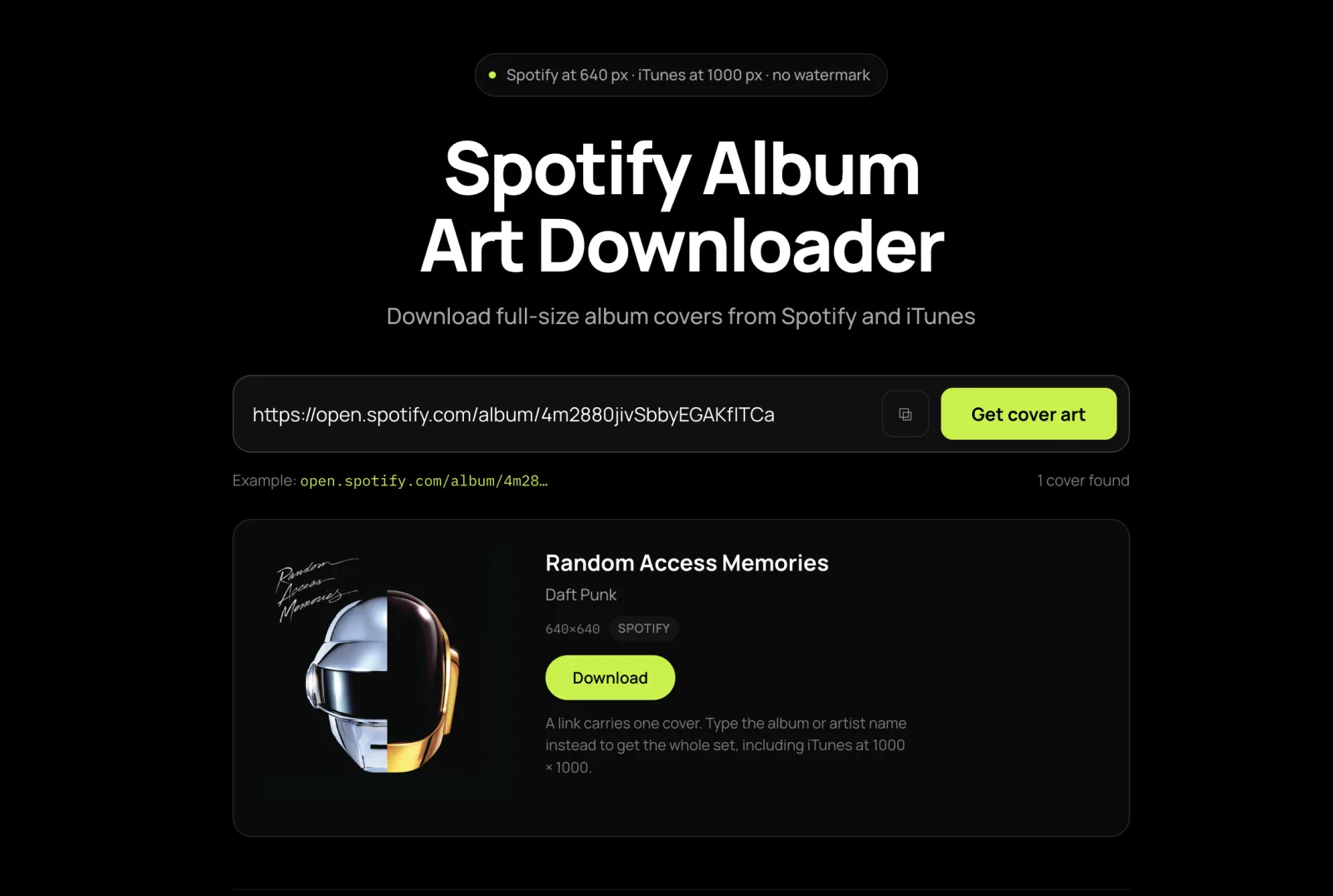
Next, paste the link or type the name into the box at the top of this page, then hit Get cover art. Each result shows where it came from and its size.
03
Download the full-size cover
Simply click Download on the cover you want. A playlist gives you every different cover in it, and Download all saves them one by one.
Covers at their real size
Features of SpotMP3 Spotify Album Art Downloader
Full-Size Covers From Spotify and iTunes
Spotify gives 640 × 640, the largest it stores, and iTunes gives 1000 × 1000. Every result is labelled with its source and size, so you can pick the bigger one at a glance.
Every Cover in a Playlist at Once
Paste a playlist link and each album cover in it is listed once, even when several songs share it. Download all saves them one after another, named Artist - Album.
Search by Artist and Album Name
No link? Type the artist and album and both catalogues answer side by side. Apple’s catalogue often has older releases and regional editions too.
Six things it does
Why this is the best free album art downloader online
Free, with No Sign-Up
No account, no watermark and no limit. Save as many covers as you like.
Never Upscaled or Watermarked
You get the original image file, not a stretched copy. No cover here is made bigger than its source.
Clear File Names
Every cover is saved as Artist - Album, so you can tell sixty covers apart without opening them.
Fix Missing Album Art
Drop a saved cover into an album folder as cover.jpg and most music players, Plex included, will show it.
Pick the Right Edition
Remasters and deluxe editions often carry different covers. Each result shows its release, so you can match the one your files came from.
Works on Every Device
Use it in Chrome or Safari on your phone or computer. There is nothing to install.
FAQ
Album art downloader FAQ
What is the largest cover size I can get?
640 × 640 from a Spotify link, which is the most Spotify stores, and 1000 × 1000 from iTunes. For a bigger image, search by artist and album and pick the iTunes result.
Can I get a 3000 px or 4K cover?
Not from Spotify: 640 px is its limit. A site offering a “4K” Spotify cover has just stretched a 640 px image. Nothing here is upscaled.
Can I download the covers for a whole playlist at once?
Yes. Paste the playlist link and every different cover in it is listed once. Download all saves them one by one, so allow multiple downloads when your browser asks.
Does it work with Apple Music and iTunes albums?
Yes. Type the artist and album name and iTunes is searched along with Spotify, with each result labelled by its source and size.
How do I add the cover to my music library?
In Apple Music or iTunes, select all the album’s songs, open Get Info and drag the image into Artwork. For Android players, foobar2000 or Plex, save it as cover.jpg in the album folder, then refresh the library.
Which result should I pick when there are several?
Match the release year to your files. Remasters, deluxe editions and regional versions often have different covers.
Is there a watermark, a sign-up or a limit?
No to all three. Images are passed through untouched, there’s no account, and you can save as many covers as you like.
What size should I make my own album cover?
A 3000 × 3000 px square, JPEG or PNG, which every distributor accepts. Don’t go below 640 × 640, or it looks soft in Spotify.
On copyright: cover art belongs to the artists, labels and photographers who made it. Saving a copy for your own library, for organising your music, or for reference is ordinary use. Publishing it, selling it or putting it on merchandise is not, and needs permission from the rights holder. Full terms are in the terms of service.