✓Original file✓No daily limit✓No ads
Spotify Podcast Downloader
Download Spotify podcast episodes, free and ad-free.
Help us keep SpotMP3 ad-free and smooth for everyone.
Built for podcast episodes
What Is SpotMP3 Spotify Podcast Downloader?
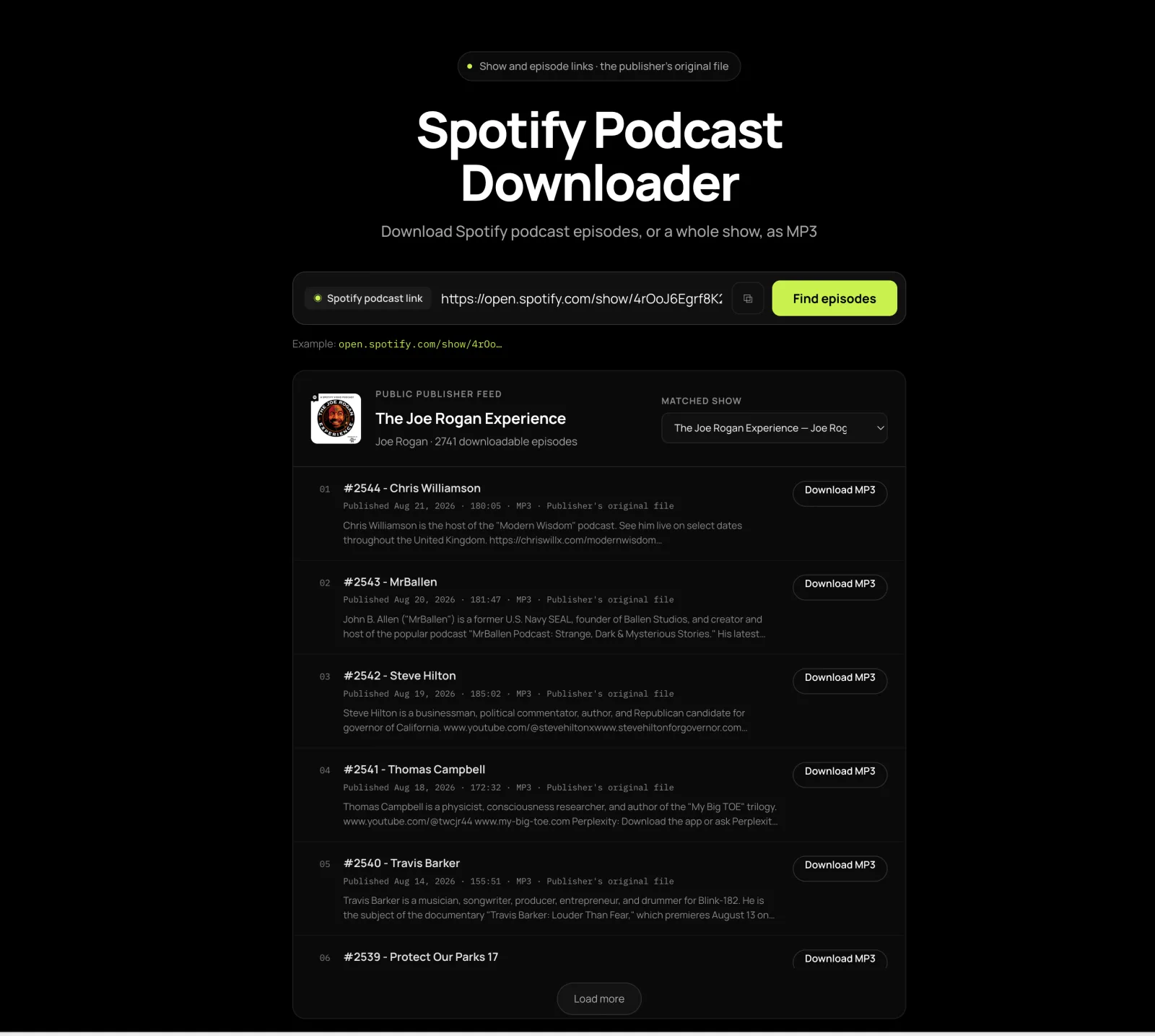
This Spotify podcast downloader saves podcast episodes from Spotify to your phone or computer. Paste a show or episode link, and it lists the episodes from the publisher’s public feed, each with its own Download button.
You get the publisher’s original file, usually an MP3, exactly as they released it, and there is no daily limit on episodes.
For songs and albums, use the Spotify downloader; for a whole playlist, the Spotify playlist downloader.
Three steps, any show
How to Download Spotify Podcast Episodes?
01
Copy the Spotify podcast link
Open the show or episode in Spotify, press the three dots and pick Share, then Copy link. A show link lists its episodes; an episode link jumps to that one.
02
Paste it into the box
Paste it into the Spotify podcast downloader above and press Find episodes. If the show above the list is not the one you meant, switch it in the Matched show menu.
03
Download the episode
Click Download on the episode you want. The Spotify podcast downloader shows each row’s format, length and size first, and Load more brings in older episodes.
Episodes, straight from the source
What Will You Get from Spotify Podcast Downloader?
The Publisher’s Original File
Each download is the exact episode file the publisher released, usually an MP3, not a lookalike found by its title somewhere else. It is the same file a podcast app would play, left unchanged.
Jump Straight to Your Episode
Paste an episode link into the Spotify podcast downloader and that episode moves to the top of the list, even if it is years old, so you skip scrolling through the archive. Load more brings in older episodes when you want to browse.
Switch Between Shows With the Same Name
Some shows share a name, so this Spotify podcast downloader keeps the closest matches in one menu above the list. Pick the right one by its publisher and artwork.
Audio and Video Episodes
When the publisher’s feed carries the video, you get their MP4. When it only carries audio, you get the audio, and the row tells you which before you press Download.
Fixes for common podcast headaches
Why Choose SpotMP3 Spotify Podcast Downloader?
Free, Ad-Free and Online
SpotMP3’s Spotify podcast downloader shows no ads, asks for no account and puts no daily limit on episodes. It runs in the browser you already use, on a phone or a computer.
A File You Can Keep
Spotify’s own downloads stay inside the app. With this Spotify podcast downloader you get a normal audio file you can copy to a USB stick, a car stereo or an MP3 player, and it keeps playing even if the episode later leaves Spotify. The Spotify to MP3 page explains how to get files playing in a car or on an MP3 player.
Size and Format Up Front
Every row shows the format, length and file size first, so a long episode never surprises your phone’s storage or data plan.
Told When a Show Can’t Be Downloaded
If a show is a Spotify exclusive with no public feed, the Spotify podcast downloader says so instead of failing quietly. Audiobooks are not supported either.
Podcast questions
Spotify podcast downloader FAQ
Is this Spotify podcast downloader free?
Yes, this Spotify podcast downloader is free, with no ads and no account. Podcast episodes aren’t counted toward the daily limit that songs have.
Which Spotify podcasts can I download?
You can download any show the publisher also shares through a public feed, which is most of them. Spotify exclusives that exist nowhere else can’t be downloaded, and neither can audiobooks.
Do I need Spotify Premium to download podcasts?
No, you don’t need Spotify Premium or an account to download podcasts here. There’s no login, and Premium doesn’t change which shows are available.
Can I download every episode of a show at once?
No, the Spotify podcast downloader has one Download button per episode. Press Load more to reach older ones; for a whole back catalogue, a podcast app with bulk download is the better tool.
What format and file size do I get?
You get the publisher’s original file, usually MP3 and sometimes M4A or MP4. Each row shows the format, length and size before you download.
The episode I pasted isn’t at the top. What now?
If the episode you pasted isn’t at the top, its title probably changed after it was published, so the newest episodes are listed instead. Press Load more and find it by date.
The wrong show was matched. How do I switch?
To switch to the right show, open the Matched show menu above the list and pick the one whose publisher and artwork you recognise.
Can I download a video podcast as MP4?
You can download a video podcast as MP4 when the publisher’s feed includes the video file. Many video shows only put audio in their feed; then you get the audio, and the row tells you before you press.
Where does the episode go on my phone?
On Android the episode goes to Downloads. On iPhone it’s in the Files app, where you can open it or share it to a podcast or media player.
Can I save an episode before it’s taken down?
Yes, you can save an episode as long as it’s still in the publisher’s public feed. Once saved, the file keeps working even if the show leaves Spotify.