✓MP3 files✓No ads✓Online
Apple Music to MP3
Convert Apple Music songs, playlists and albums to MP3.
Help us keep SpotMP3 ad-free and smooth for everyone.
Start with a public music link
What Is the Apple Music to MP3 Converter?
The Apple Music to MP3 converter turns public music links into separate, tagged MP3 files by matching song details to available audio. Use this Apple Music to MP3 converter online when you want files for a compatible player, with no app to install or account to create.
Already have an audio file? This tool does not accept uploads. For supported, unprotected files in your Mac library, follow Apple’s file-conversion instructions. Protected subscription downloads are a different input: you cannot upload or unlock them here. Use the public song link to look for an audio match instead.
For supported links, song search and official offline steps, see the Apple Music downloader.
From a shared link to a file
How to Convert Apple Music to MP3
01
Paste the Apple Music link
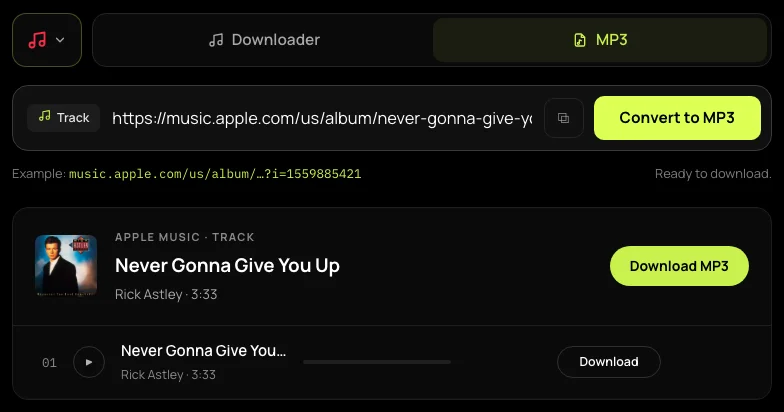
Copy a song, album or public playlist link from Share in Apple Music. Paste it into the Apple Music to MP3 converter above and press Convert to MP3. An album link containing ?i= opens that specific song. You can also search for a song, album or artist by name.
02
Choose and check the recording
Check the song title, artist and duration, then choose the rows you want. Press play to prepare and hear a full-song preview; previews use the same free allowance as downloads. If the matched recording is a live take or the wrong version, leave it out of your selection.
03
Save your MP3 files
For a single-song result, press Download MP3. In a list, use Download on a row or Download selected. Free downloads save separately; supporters can collect a selection in one ZIP. Extract the ZIP before moving the files to another device, and allow multiple downloads if prompted.
Separate files, useful song details
What Your Apple Music to MP3 Files Include
Convert one song or pick from an album
The Apple Music to MP3 converter gives you a separate file for each successful song. Paste one track to keep the job small, or choose a few rows from an album. You can test a file on your player before preparing a larger selection.
Apple Music Playlist to MP3
Convert the available songs from a public playlist, with individual selection and supporter ZIP delivery. Load more when offered and check the partial-list notice. A ZIP contains the successfully prepared files; it cannot recover songs absent from the public list or tracks that failed to match.
Recognise your songs in a player
Available title, artist, album, track number and cover art are written into the MP3, so compatible players can organise your songs. Files use Artist - Title names. When synced lyrics are found, you can save a separate .lrc file beside the audio.
Check the sound before you keep it
SpotMP3 encodes the output as 320 kbps MP3. That number describes the file, not the quality of the recording it matched: the file cannot sound better than its source. Listen to the preview to check the version. This is not an export of Apple’s lossless or Dolby Atmos audio.
Try one song on your device first
Use Your Apple Music to MP3 Downloads
Take a file to your MP3 player
After converting Apple Music to MP3, connect a player that supports file transfers to your computer and follow its transfer instructions. For a car stereo, check its supported formats and USB requirements. Copy one MP3 first and test playback before moving a whole folder.
Keep a file you can find
Save your Apple Music to MP3 downloads in a folder you recognise on your PC or Mac. On iPhone, find Safari downloads in Files; on Android, check Downloads. Open the file with a compatible player. Downloading it does not automatically add it to the Apple Music app.
Converting links from another service? The Spotify to MP3 converter uses the same player, download allowance and supporter access.
Formats, recordings and file playback
Apple Music to MP3 FAQ
Is this a free Apple Music to MP3 converter?
Yes, this is a free Apple Music to MP3 converter with no ads or sign-up. Free use allows three songs per batch and 30 a day per IP address, including full-song previews. The allowance is shared with Spotify downloads and resets at midnight UTC. Supporter access removes the free daily limit and enables larger batches with ZIP delivery.
How do I convert Apple Music to MP3 online?
To convert Apple Music to MP3 online, paste a public music link, press Convert to MP3, then download the songs you select. The converter matches those song details to available audio. You do not need to upload a file, install an extension or supply your Apple ID.
Can I convert Apple Music subscription downloads to MP3?
You cannot convert Apple Music subscription downloads to MP3 with this tool. It accepts public music links and name searches, not protected files from your subscription. The audio is matched separately, so it may differ from the version you hear in Apple’s app.
Can Apple’s Music app convert my own audio files?
Apple’s Music app on Mac can convert supported, unprotected audio files already in your library: choose Music → Settings → Files → Import Settings → MP3 Encoder, select a song, then File → Convert → Create MP3 Version. This is for existing files, not protected subscription downloads.
How do I download music from Apple Music to MP3 in a batch?
To download music from Apple Music to MP3 in a batch, paste a public album or playlist link and select the available songs. Free selections contain up to three tracks; supporters can select more and receive a ZIP. If the list is marked partial, even Select all includes only the loaded tracks.
Can I get M4A, FLAC or lossless audio instead?
You cannot get M4A, FLAC or lossless audio from this Apple Music to MP3 converter. The output is MP3 only. Re-encoding a compressed source cannot restore missing detail, and the 320 kbps output setting is not a claim about the original recording’s quality.
Why is the downloaded song a different version?
The downloaded song can be a different version because matching may find a live recording, remix or cover. Check the full-song preview before saving. When alternative matches are available, a failed row offers other recordings to try; that picker is not available for a song that completed successfully.
Will the files keep my playlist order?
The files do not guarantee your playlist order on another player. Track tags describe an album position, while file names use Artist - Title. Use a player playlist or add number prefixes in your intended order. Renaming files alone cannot reconstruct an order you have not recorded.