✓Free✓No ads✓No sign-up
Apple Music Downloader
Download Apple Music songs, playlists and albums as MP3 files.
Help us keep SpotMP3 ad-free and smooth for everyone.
A link, a song list, your files
What Is SpotMP3 Apple Music Downloader?
SpotMP3 is a free Apple Music downloader for public songs, albums and playlists. Use the Apple Music downloader to find tracks, choose what to keep and save available audio matches as MP3 files. You can also search a name or browse the releases shown on a public artist page.
Just want an Apple Music download for offline listening? In Apple’s app, add music to your library, then choose Download with an active subscription. See Apple’s offline download steps. For a separate file, use the tool above; it matches audio elsewhere and does not export your subscription’s recordings.
Need help with file quality or an MP3 player? Read the Apple Music to MP3 converter guide.
Copy, choose, download
How to Use the Apple Music Downloader Online
01
Copy a link from Apple Music
Open the song, album or playlist in Apple Music, choose Share and copy its link. The address from the web player works too. Keep the whole link: a song shared from an album includes a song ID after ?i=, which tells us which track you want.
02
Open the list and pick your songs
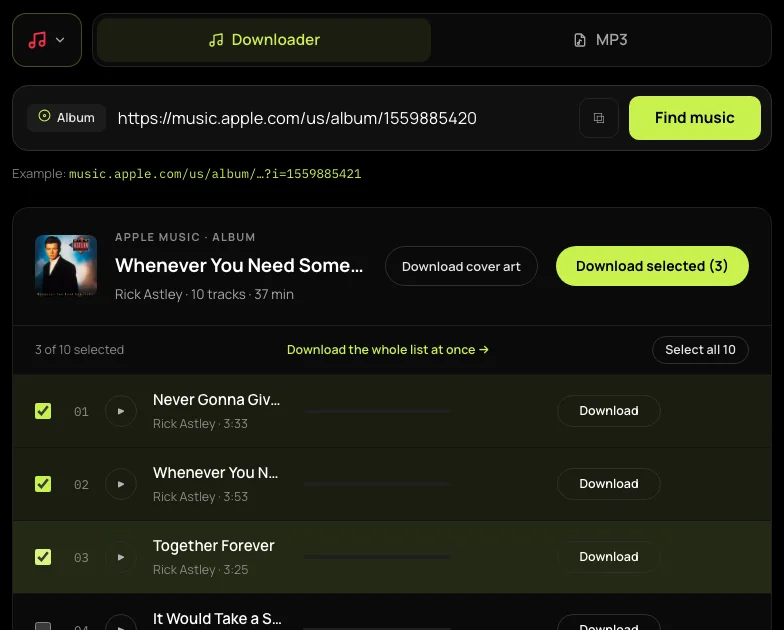
Paste the link into the Apple Music downloader and press Find music. Check the titles and artists, then tick the songs you want. Use Load more when it appears. If only part of a playlist is available, read the notice before selecting all: the selection covers the loaded rows.
03
Download the selected songs
Press Download selected, or Download MP3 for a single song. Free downloads save separate MP3 files as they finish; supporter selections arrive in a ZIP. Keep this tab open and allow multiple downloads if your browser asks. You can play a song to check the recording before saving it.
Song links, shared lists and search
Apple Music Downloads You Can Choose
Pick the song you meant
The Apple Music downloader recognises a song link even when it opens on an album page. Keep the ?i= part of that address to load the selected song. Paste the album link without it when you want to choose from the album instead.
Choose a few songs or a loaded list
SpotMP3 puts a checkbox beside each available track, so you can leave out songs you already have. Some public playlists expose only part of their contents. A partial-list notice stays visible, and Select all selects the tracks loaded here; it does not promise your whole library.
Find a song when you have no link
Type a song, album or artist name into the Apple Music downloader. Name searches use the US catalogue; a pasted link keeps its country. Artist results show available top songs and releases, with a partial-list notice. For a playlist, paste its public link instead of searching its name.
Keep the downloads that finish
Free downloads save each completed song separately, so one failed match does not hide the songs already saved. Supporter access bundles the selection into a ZIP. Check any failed rows before leaving; a finished batch can still contain songs that could not be matched.
Your browser saves the file
Use the Apple Music Downloader on Your Device
Save music to your computer
Use the Apple Music downloader online in your browser on a PC or Mac. Finished files go to your browser’s download location, usually Downloads. Open that folder to organise the songs; you do not need to install a converter or an extension.
Find the files on your phone
On iPhone, open Files and check the Downloads folder selected in Safari settings. On Android, check your browser’s Downloads list or your file manager. A browser download is a separate file: it does not automatically appear in your Apple Music library.
Safari download location can vary. Follow Apple’s guide to finding downloads in Files. Have a Spotify link? Use the Spotify downloader.
Links, limits and offline listening
Apple Music Downloader FAQ
Is this Apple Music downloader free?
Yes, this Apple Music downloader is free and ad-free. You can download up to three songs per batch and 30 a day per IP address. Full-song previews count toward the same daily allowance, which resets at midnight UTC. Spotify and Apple downloads share that allowance; supporter access removes the free daily limit and enables larger batches.
Do I need an Apple Music subscription or Apple ID?
You do not need an Apple Music subscription or Apple ID to use the Apple Music downloader. A public link or a name search is enough. The tool cannot sign into your account, read your private library or access private playlists.
How do I download songs on Apple Music for offline listening?
To download songs on Apple Music for offline listening, use Apple’s own app with an active subscription: add the song, album or playlist to your library, then choose Download. Those downloads play inside the app. They are different from the separate MP3 files this tool creates from matched audio.
Can I download all songs in my Apple Music library?
You cannot download all songs in your private Apple Music library here. The Apple Music downloader reads public links. Even a shared playlist can expose only some tracks, so check the coverage notice and loaded song list before downloading. Supporter access changes the batch limits, not which songs are available.
Why does my playlist show fewer songs?
Your playlist can show fewer songs because its public page supplies only part of the list, or because some entries are unavailable. SpotMP3 shows these limits instead of treating the displayed count as a guaranteed full total. Load more only reveals additional tracks that are available to this tool.
Can I use the Apple Music downloader on Windows 11?
You can use the Apple Music downloader on Windows 11 in a current browser, without a desktop converter. For official offline listening, use Apple’s Windows app instead. Downloading the Apple Music app and saving a separate music file are different tasks.
Does this save the original Apple Music audio?
This does not save the original Apple Music audio. The Apple Music downloader uses the link to identify songs and matches them to available audio elsewhere. A match may be a different recording, so listen before saving. Apple subscription downloads, lossless audio and Dolby Atmos are not exported.
Why did only one of my selected files save?
Only one selected file may save if your browser blocks multiple downloads. Check its download permissions, allow this site to save multiple files and try the remaining songs again. Also check each row for a failure message; a blocked save and a failed audio match need different fixes.