✓Over 100 songs✓Pick any songs✓No ads
Spotify Playlist Downloader
Download Spotify playlist to MP3.
Help us keep SpotMP3 ad-free and smooth for everyone.
Built for playlists
What Is SpotMP3 Spotify Playlist Downloader?
This Spotify playlist downloader saves the songs in a public playlist as MP3 files on your phone or computer. Use it to download Spotify playlist songs for your gym mix, a road trip or a list a friend shared, in full or just the songs you pick.
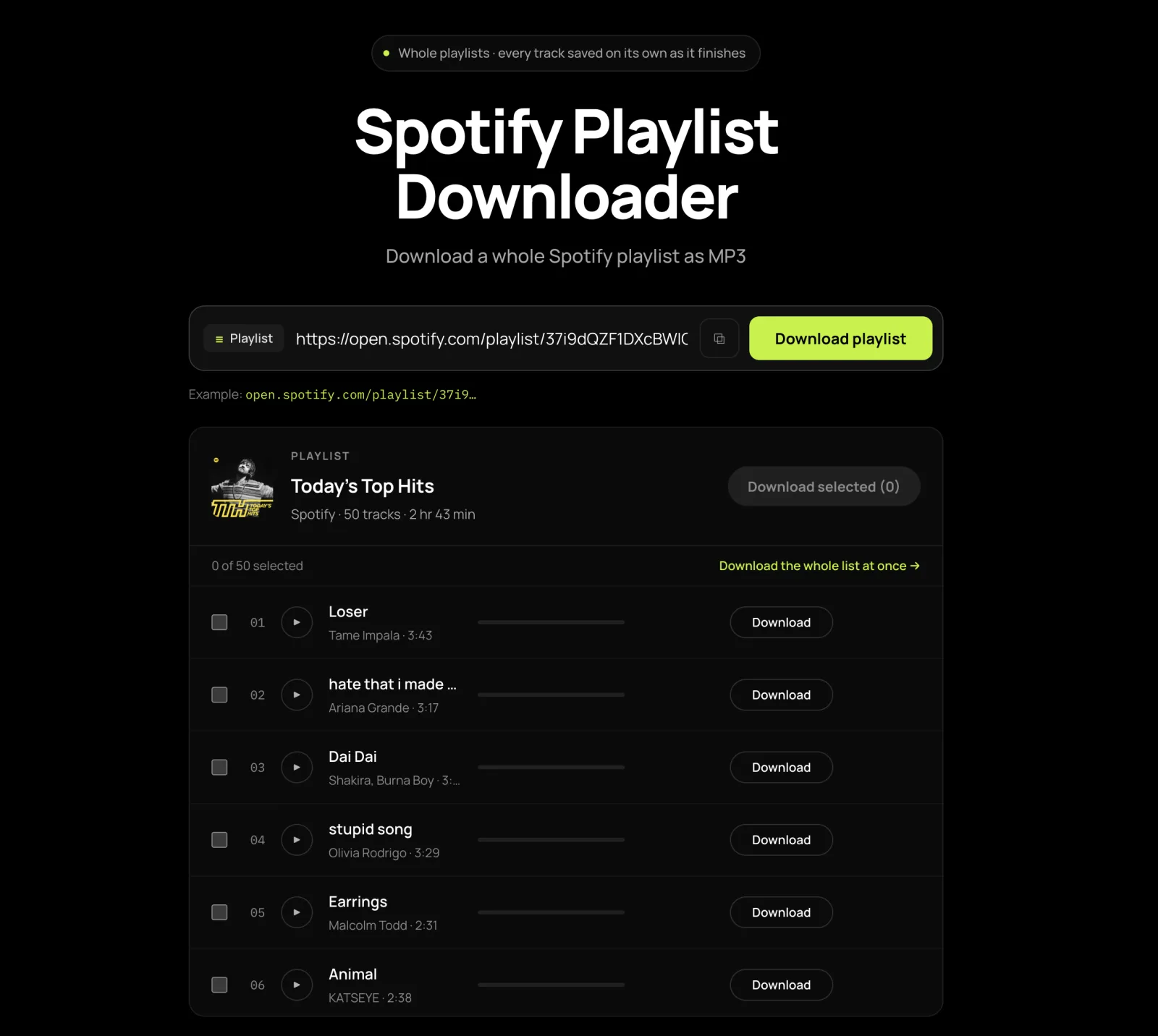
Paste a link into the Spotify playlist downloader to see every song, even in playlists with more than 100 songs. It works with Spotify’s own playlists too, such as Today’s Top Hits. Each song you download arrives as its own MP3 with the title, artist, album and cover art inside, though a few songs may not find a match.
For songs, albums and artists, use the Spotify downloader.
Three steps, any playlist
How to Download Spotify Playlist Songs as MP3?
01
Copy the Spotify playlist link
Open the playlist in the Spotify app, tap the three dots next to its name, and choose Share, then Copy link to playlist. In the web player, copy the address from your browser bar instead. The playlist needs to be public.
open.spotify.com/playlist/…
02
Paste it into the box
Paste the link into the Spotify playlist downloader above and press Download playlist. Every song appears in a list with its artist and length. If the playlist has more than 100 songs, press Load more to see the rest.
03
Download Spotify playlist to MP3
Tick the songs you want and click Download selected. Free downloads save each MP3 as soon as it is ready; with supporter access, the whole selection arrives as one ZIP file. Keep the tab open until the Spotify playlist download finishes, and allow multiple downloads if your browser asks.
Night Drive Mix · 48 MP3s
Whole playlist or a few songs
What Will You Get from Spotify Playlist Downloader?
Download Entire Playlists as ZIP
Download Spotify playlist songs in one go instead of clicking through them one at a time. With supporter access, the Spotify playlist downloader takes the whole list in one go and hands it back as a single ZIP that holds only your MP3s and their lyrics files. Free downloads take up to three ticked songs per batch.
Playlists Over 100 Songs
Long playlists are no problem: this Spotify playlist downloader keeps going past song 100. Paste a long playlist, press Load more until every song is showing, then tick what you want. Select all picks only the songs already on screen.
Pick Individual Songs from Any Playlist
Only want a few songs? Tick those and leave the rest, or press a row’s own Download button to save just that one. For a single track link, use the Spotify song downloader.
Hear Every Song Before You Save It
SpotMP3 matches each song from public sources rather than copying it from Spotify, so the version you get can differ from the one you added. Press play to hear the whole song before you save it, and leave out any karaoke, cover or live version you did not want.
Fixes for common playlist headaches
Why Choose SpotMP3 Spotify Playlist Downloader?
Free and Ad-Free
SpotMP3’s Spotify playlist downloader is free to use and shows no ads, pop-ups or redirects. You get the songs as MP3 files named Artist - Title, with nothing to install and no account to create. Free use has a per-batch and a daily limit, listed in the FAQ.
A Failed Song Tells You Why
SpotMP3 shows a reason when a song cannot be downloaded. The song stays in your list with other recordings to choose from and a Retry button, so you always know which songs you have.
Keep the MP3s You’ve Saved
One failed song does not stop the rest of your Spotify playlist download. Free downloads save each MP3 as soon as it is ready, so the songs already on your device stay there even if you close the tab before the list finishes.
Ready for Your Car, Phone or MP3 Player
When you download Spotify playlist songs here, each 320 kbps MP3 carries its title, artist, album and cover art, so the playlist shows real names on a phone, a car USB stick or an MP3 player instead of Unknown Artist. Lyrics come as a separate file when available. The Spotify to MP3 page has more about the files.
Playlist questions
Spotify playlist downloader FAQ
Can I download a whole playlist at once, and do I get a ZIP?
Yes, you can download a whole playlist at once with supporter access, and it comes back as one ZIP file. Load the full list, press Select all, then Download selected. Free downloads save up to three songs per batch, each as its own MP3.
Is this Spotify playlist downloader free?
Yes, this Spotify playlist downloader is free, with no account and no ads. Free use covers up to three songs per batch and 30 songs a day per IP address, and playing a song counts toward the same 30. The daily count resets at midnight UTC. Supporter access lets you take the whole playlist at once.
Does the playlist have to be mine, or do I need Spotify Premium?
No, the playlist doesn’t have to be yours, and you don’t need Spotify Premium or even an account. Any public playlist link works, including one a friend shared with you.
Which playlists can I download — private ones, Liked Songs, Discover Weekly?
You can download any public playlist, including collaborative ones and playlists made by Spotify. Make a private playlist public while it loads, then switch it back. For Liked Songs or Discover Weekly, copy the songs into a new playlist first. Local files you added to Spotify yourself can’t be found.
Can this Spotify playlist downloader handle more than 100 songs?
Yes, this Spotify playlist downloader handles playlists with more than 100 songs. The list opens with the first 100; press Load more to show the rest, then tick any of them. Select all picks only the songs already on screen.
How long does it take to download a Spotify playlist?
A Spotify playlist download has no fixed time: each song depends on the track, where its audio is found and how busy the queue is. Several songs are prepared at the same time, so keep the tab open until the last one saves.
Can I download a Spotify playlist on iPhone or Android?
Yes, you can download a Spotify playlist on iPhone or Android, right in Safari or Chrome, with nothing to install. A playlist means many files, so allow multiple downloads when asked, and keep the page open until the last song saves, because some mobile browsers pause downloads in the background. Songs land in the Files app on iPhone and the Downloads folder on Android.
Why are some songs from my playlist missing?
Some songs from a playlist go missing when no good match is found for them. Each one stays in the list with the reason, other recordings to choose from and a Retry button. Podcast episodes in a playlist are skipped.
Why did my playlist come out in alphabetical order?
Your playlist comes out in alphabetical order because the file names have no track number in front, so players sort them A to Z. Renaming cannot work out the playlist’s order for you: first arrange the files to match the playlist in Spotify, then add a number to the front of each name. Once they are in order, a batch-rename tool such as Rename with Name and Index in the macOS Finder can do the numbering.